Google now reports how often your pages turned up inside AI Overviews and AI Mode. It arrived on 3 June 2026, it sits in Search Console right next to the performance data you already stare at every Monday, and it ships with exactly one metric: impressions. No clicks. No click-through rate. No queries. That single omission decides what you can honestly put in a monthly report, and almost every write-up jogged straight past it.
We got access on one property and not the other, which is normal for a staged rollout and deeply annoying if you are the person who promised somebody a number by Friday.
There is also a plot twist we did not expect when we started digging. Microsoft already ships the one thing Google withholds, and it has been sitting there for months.
What is the generative AI performance report in Search Console?
It is a dedicated view showing how often links to your site appeared inside Google's generative AI features. Google announced it on 3 June 2026, in a post by Hillel Maoz and Moshe Samet from the Search Console team. Two reports shipped on the day: one for Search, one for Discover.
The Search version covers AI Overviews and AI Mode, and Google says it expects that list to grow. Experiments running in Search Labs are excluded, so anything you spot in a Labs test will never show up here.
One thing worth being clear about, because we have seen it argued both ways on Reddit: this data was already inside your overall performance report. It was mixed in with everything else and there was no way to separate it. What shipped in June is the separation, not the data. If somebody tells you the new report is redundant because "you can already filter the normal performance report by page", they have misread it. You could always see the total. You could never see the slice.
Which metrics does the AI performance report actually show?
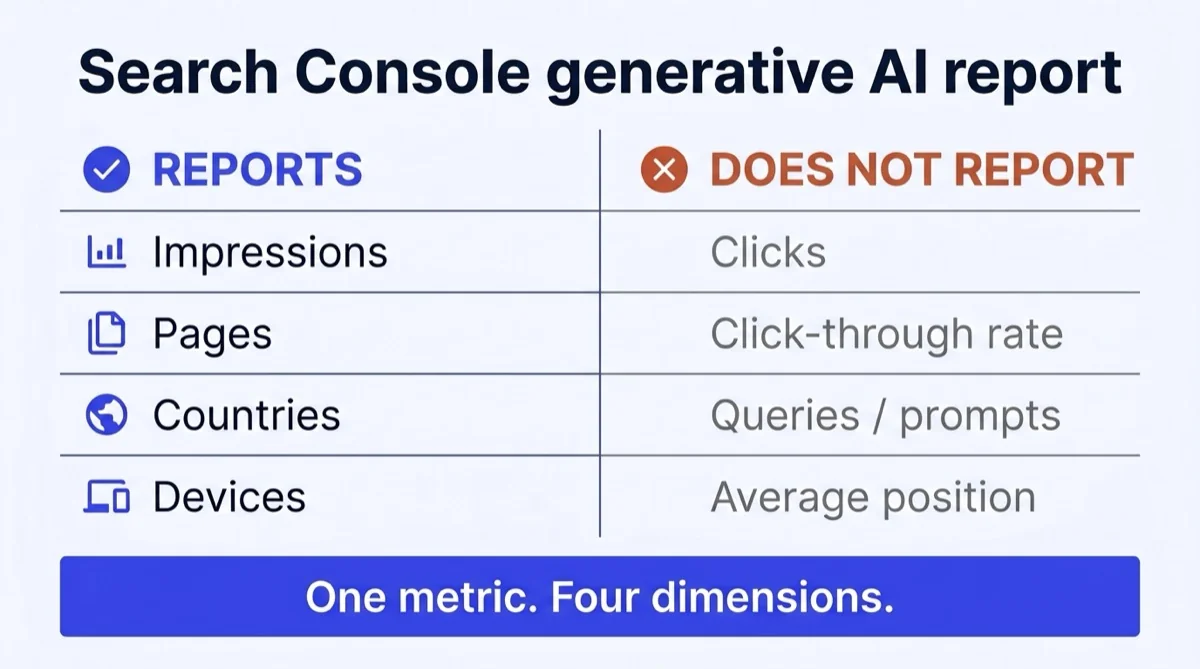
One metric and four dimensions. That is the entire thing, and knowing its shape in advance saves you from promising your CMO a number the report cannot produce.
| What you get | What you don't get |
|---|---|
| Impressions | Clicks |
| Pages (grouped by canonical URL) | Click-through rate |
| Countries | Queries or prompts |
| Devices (Search only) | Average position |
| Dates: hourly, daily, weekly, monthly | Anything from Search Labs |
Impressions count how many times links to your site were shown to someone inside a generative AI feature. Google has said it is "continuing to work with website owners to understand what insights and data would be most helpful", and mentions "adding additional metrics over time". So this may well loosen. Plan around today's shape, not the shape you are hoping for.
The Pages dimension is the one to open first, and we will come back to why.
Why can't I see the report yet?
Three reasons, and only one of them is your fault.
The rollout is partial. Google is releasing it "to a subset of websites, allowing us to thoroughly test them and receive feedback before making them widely available." If your property is not in that subset, waiting is the entire fix. Filing a bug will not move you up the queue.
Your volume may be too low. The site simply may not have collected enough impressions inside AI features to populate anything yet. Small sites, new sites, and sites in categories where Google rarely triggers an AI answer will see a lot of white space.
Somebody opted you out. This is the self-inflicted one, and it is the first thing we would check. If anyone on your team ever switched off the Search generative AI features control to protect traffic, you removed yourself from the surface, and therefore from the report that measures the surface. Check that before you blame Google.
Bing already gives you the query data Google withholds
Here is the finding we did not expect. Microsoft's AI Performance dashboard in Bing Webmaster Tools reports grounding queries, which Microsoft describes as the phrases that "reveal the key phrases AI used to retrieve content that was cited."
Read that again, because it is the single biggest gap in Google's report. A grounding query is not what the user typed. It is the query the assistant wrote for itself, behind the scenes, when it went looking for sources. That is the search you are genuinely competing in, and Microsoft shows it to you for free.
It goes further. Microsoft added grounding query to page mapping, so you can click a query and see which of your pages got cited for it, or click a page and see which queries drove its citations. Google's report has no query dimension at all.
To be fair to both sides, here is the honest comparison:
| Google (Search Console) | Microsoft (Bing Webmaster Tools) | |
|---|---|---|
| Surfaces covered | AI Overviews, AI Mode | Copilot and Bing's AI answers |
| Core metric | Impressions | Citations |
| Query-level data | None | Grounding queries, mapped to pages |
| Clicks | No | No |
| Cost | Free | Free |
Neither one gives you clicks. Both are counting exposure. But if you want to know what question you got pulled into, only one of them will tell you, and it is not the one everybody wrote about in June.
Takeaway: verify your site in Bing Webmaster Tools this week, even if Bing sends you almost no traffic. You are not there for the traffic. You are there for the grounding queries, which are the closest thing anyone currently publishes to a keyword list for AI search.
Three things the Google report will not tell you
These limits are all documented rather than obvious, which is exactly why they keep catching people out.
1. You cannot calculate AI click-through rate. At all.
No clicks means no CTR. If a consultant hands you an "AI CTR" figure derived from this report, they either built it from a different data source or they invented it. There is no third option.
You can still do something useful with impressions on their own, which is what the calculator below is for. What you cannot do is divide by a number that does not exist.
2. The chart and the table will disagree, and both are right
This one caught us out properly. The chart aggregates by property, so if two of your pages appear inside the same AI answer, Google counts that as one impression. Group the table by page and it aggregates per page instead. Same underlying data, two different totals, no bug anywhere.
So never sum the page-level table and expect it to match the headline chart above it. We lost most of an afternoon to this, hunting a tracking problem that did not exist, before somebody finally found the aggregation note in the help documentation. Learn from our stupidity and save yourself the afternoon.
3. Impressions land on the canonical URL, not the page that appeared
Data is assigned to the canonical URL after redirects, exactly like the regular performance report. If you run a page with several parameter variants, or a duplicate that canonicalises somewhere else, the credit consolidates. Your best-performing AI page might be filed under a URL you were not expecting, which makes the Pages list look wrong when it is behaving perfectly.
Two smaller limits worth knowing before they bite: the 1,000-row cap from the standard performance report applies here too, so the long tail stays invisible without a BigQuery export. And every date is in Pacific Time, which will quietly shift your week boundaries if your reporting runs on local time.
What your AI impressions actually tell you
Runs entirely in your browser. Nothing is sent anywhere.
Enter your totals from Search Console. Both figures sit in the same property, under Performance and the generative AI report.
Is the report even useful, or is it a vanity metric?
It is useful for exactly two jobs and misleading for everything else, so the trick is knowing which two.
The criticism is fair and worth stating plainly. One SEO put it well in an r/SEO thread this month: they had not found the report useful, because impressions alone do not tell you what to change. That is true. Impressions are not a lever. Nobody ever fixed a business by watching a number.
Where it earns its place is here.
Job one: the Pages list. This is the free bit that nobody talks about. It tells you which of your URLs Google's AI features are actually pulling. In our experience that list is shorter and considerably weirder than anyone expects, and it is the best input to a content plan you will get for nothing. When we looked, the pages being pulled were not the pages we would have guessed.
Job two: the direction of travel. Week over week movement on the same property, measured the same way, is a clean signal. That is genuinely worth having.
Everything else people want it to do, it does not do.
What can you actually do with impressions-only data?
Five things, as long as you stop trying to force it into a traffic story.
- Track direction, not magnitude. Same property, same method, week over week. Absolute comparisons against a competitor are impossible, because you only ever see your own data.
- Find your AI-visible pages. Covered above, and still the strongest reason to open the report at all.
- Watch the gap between AI and classic impressions. If generative impressions climb while organic clicks flatten, you are being read without being visited. That is a real finding, and it is the argument for putting your conclusion above the fold instead of saving it for a big finish at the end.
- Segment by country before you localise. A market with disproportionate AI impressions is a market where your content is being summarised to people who never appear in your analytics at all.
- Set your baseline now. The data only starts when your property was enrolled, so the earlier you screenshot a baseline, the sooner year-over-year becomes possible. This costs you thirty seconds and there is no way to go back and get it later.
One honest limit across all five: an impression inside an AI answer is not equivalent to an impression on a blue link. Somebody reading a summary that mentions you may never need your page at all. Treat the metric as evidence of inclusion, not evidence of interest.
Does ranking well in Google mean you get cited by AI?
Much less than you would assume, and this is the most uncomfortable number in the whole article.
Ahrefs analysed 15,000 prompts and found that only about 12% of URLs cited by ChatGPT, Gemini and Copilot rank in Google's top 10 for the same prompt. Broken out by assistant, ChatGPT's in-text citations overlapped with Google's top 10 just 8.0% of the time, and its reference list 6.1%. Perplexity was the outlier at 28.6%.
Worth flagging the obvious: Ahrefs sells an AI visibility product, so they are not a neutral party. We cite them anyway because the sample is large, the methodology is published, and nobody else has run the study at that scale. Judge it accordingly.
Now hold that next to Google's own position, which is that generative AI features "are rooted in our core Search ranking and quality systems". Both things are true at once, and the resolution is less contradictory than it looks. Ranking well makes you eligible. It does not make you quotable. Those are different problems and most teams only work on the first one.
A follow-up Ahrefs study of 1.4 million ChatGPT prompts, published in April 2026, points at what closes the gap. Cited pages had noticeably higher semantic similarity between their titles and the query being asked, 0.602 against 0.484 for pages that were retrieved and then passed over. Pages with natural-language URL slugs were cited 89.78% of the time, against 81.11% for those without. And the median cited page was around 500 days old, while the uncited ones skewed overwhelmingly young.
Which, if you squint, is quite an old-fashioned set of instructions. Write a title that matches the question. Use a readable URL. Publish early enough that the page has been around a while. All three are decided when you plan the page and its keywords, not when you try to retrofit them afterwards.
Takeaway: if your audit says you rank on page one but never get cited, that is not a ranking problem and no amount of link building will fix it. It is a phrasing problem. Your page probably answers the topic without ever answering the question.
Does this replace an AI visibility tool?
Partly, and the honest answer depends entirely on how many brands you report on.
For a single site, this report plus a manual prompt audit covers most of what a $99-a-month tracker gives you. Its advantage is genuinely unmatchable: the numbers come from Google, not from a script pretending to be a browser. Its disadvantage is just as clean, in that it tells you precisely nothing about ChatGPT, Perplexity, Claude, or any other assistant your buyers are actually using.
If you want the manual half, we wrote the method up as a step-by-step AI visibility audit you can finish in an afternoon. And if you are weighing up a paid tool, the guide to AI visibility tools covers the five categories and which one fits which team.
What does Google say to do about low AI visibility?
Fix the SEO. That is not us dodging the question, it is Google's own published position.
In its guide to optimizing for generative AI features, Google asks whether existing SEO practices still apply and answers: "In short, yes! The best practices for SEO continue to be relevant because our generative AI features on Google Search are rooted in our core Search ranking and quality systems." It adds, on the same page, that "optimizing for generative AI search is optimizing for the search experience, and thus still SEO."
That document also names four tactics you can skip: llms.txt files, content chunking, AI-specific rewrites, and chasing inauthentic mentions. Which leaves the GEO work that actually pays looking a lot like SEO with a shorter first paragraph. If somebody has told you to add an llms.txt to improve AI visibility, Google has now said in writing that you do not need one. We had one on this site before that guidance landed, and we never managed to attribute a single thing to it.
If you want a hand turning the Pages list into an actual content plan, that research-and-draft loop is roughly what we built Aiter for. The reading of the report is still yours to do.
So: have you checked whether your grounding queries look anything like your keyword list? We would genuinely like to know if anyone finds them matching, because ours did not.
Frequently asked questions
Does the generative AI report include ChatGPT or Perplexity?
No. It covers Google surfaces only, specifically AI Overviews and AI Mode, plus a separate report for generative features in Discover. Visibility inside other assistants needs a completely different method.
Does Bing have an AI performance report too?
Yes, and in one respect it is better. Bing Webmaster Tools reports citations from Copilot and Bing's AI answers, and it shows grounding queries, the phrases the assistant generated internally to find sources. It has no click data either, but it is the only free report that gives you anything query-level.
Why are my AI impressions so much lower than my organic impressions?
Because AI features only appear on a fraction of queries, and your site then has to be selected as a source for that specific answer. A ratio in the low single digits is completely normal and is not a sign that anything is broken.
Can I see which prompts triggered my page?
Not in Google's report. There is no query dimension. Bing's grounding queries are the nearest available substitute, and prompt-level auditing everywhere else still has to be done by hand.
Is the impressions data delayed?
The newest data is marked preliminary and drawn as a dotted line, because it is still being collected and can change within a few hours. Do not report on yesterday.
Should I block my content from AI features to protect traffic?
You can, through the Search generative AI control, and we would think very hard first. Opting out removes you from the surface and from this report, so you lose the visibility and the ability to measure what you lost. That is a difficult meeting to walk into.
How do I get year-over-year comparisons?
You cannot yet, because the data only reaches back to when your property was enrolled. Export a baseline every month from now on and you will have comparisons a year sooner than the teams who wait.
Does the report prove AI search is stealing my clicks?
It cannot prove that on its own, because it has no click data. Pairing rising AI impressions with flat or falling organic clicks on the same pages is suggestive. It is not proof, and anyone presenting it as proof is overreaching.